Software Development Life Cycle Diagram
The complete loop from discovery and design through build, CI/CD, operations, and feedback—six phases and twenty-four stages in one visual.
- Free to view
- No signup
- PNG · SVG · PDF · draw.io · Mermaid
- Free to reuse with credit
- Created by Software Delivery Observatory
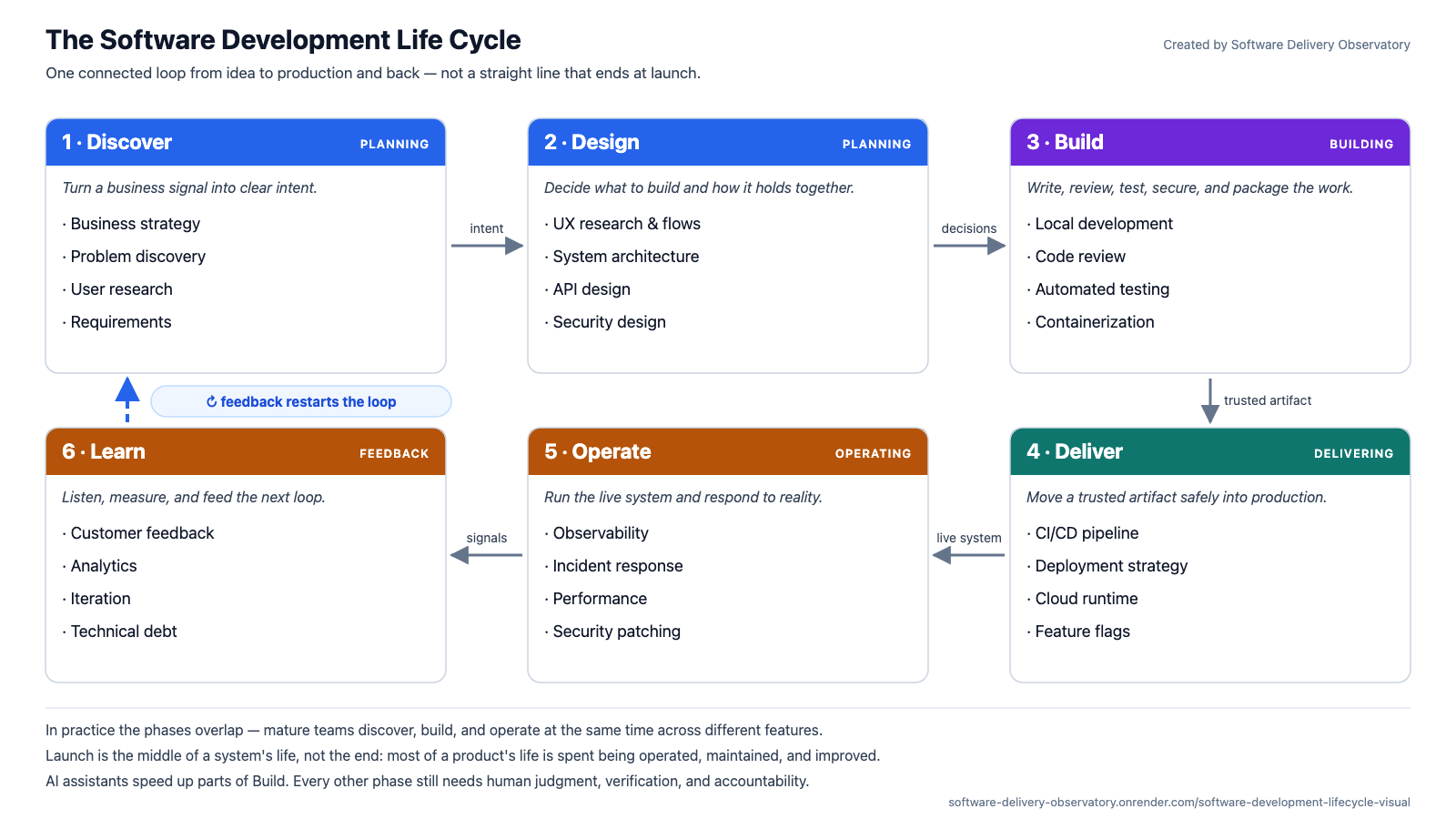
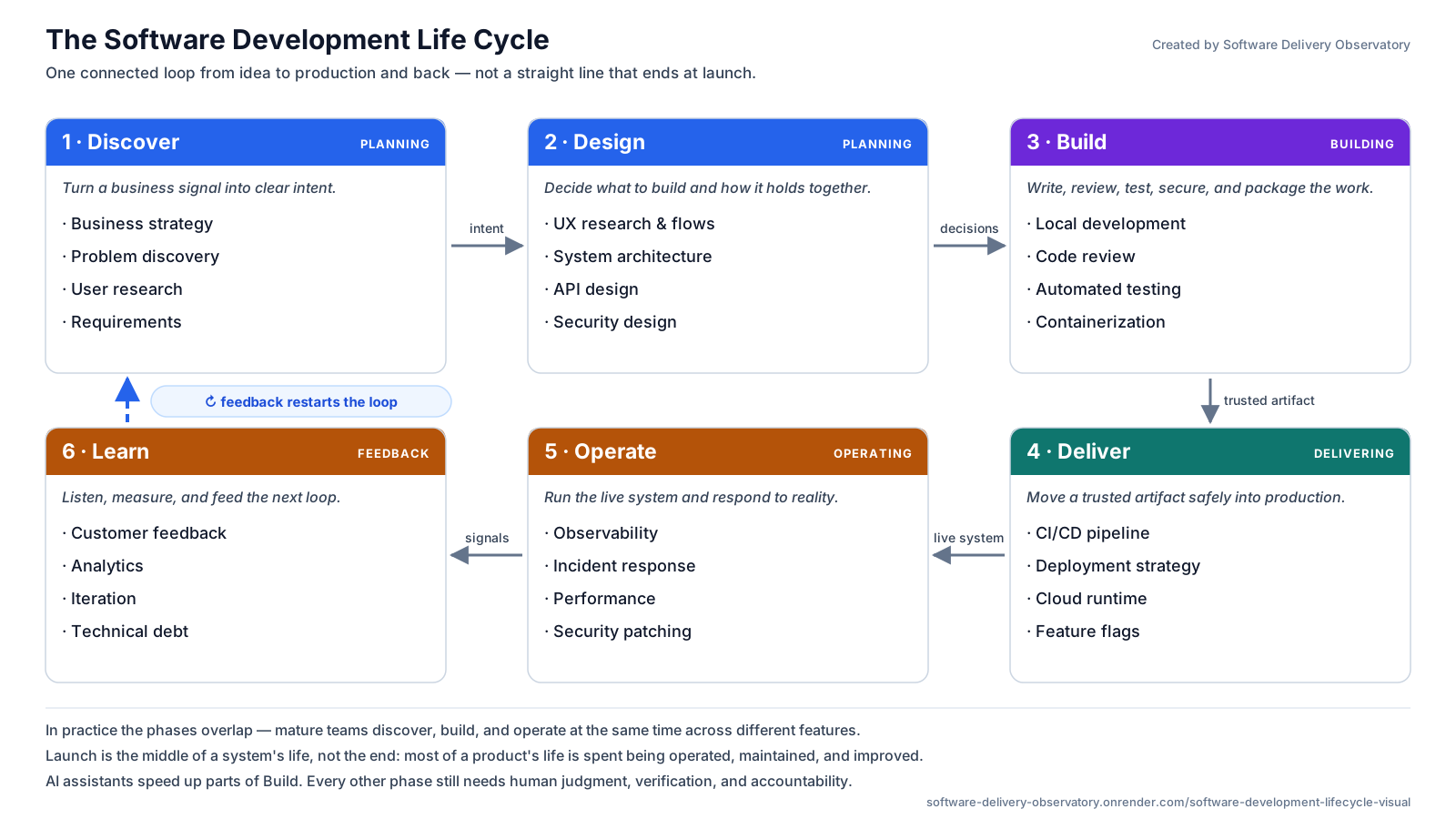
Download the diagram in the format you need
Every format is the same diagram, free, with no signup. Free to use with credit — including at work and in teaching.
- PNG.png
1600×900 image. Drop straight into slides, docs, or a blog post.
- SVG.svgEditable
Vector master — stays sharp at any size. Opens as editable shapes in Figma, Illustrator, PowerPoint, and Visio.
- PDF.pdf
One landscape page with selectable text. This is the one to print for a classroom or a wall.
- draw.io.drawioEditable
Fully editable source. Open free at diagrams.net and change any box, label, or arrow.
- Mermaid.mmdEditable
Diagram-as-text. Paste into GitHub, GitLab, Notion, or Obsidian and it renders itself.
Explore the lifecycle
Open any phase to see why it exists, what it consumes and produces, who is involved, how it usually fails, and what it hands to the next phase.
1 Discover — Turn a business signal into clear intent.
- Why this phase exists
- So the most expensive resource a team has — engineering time — is spent on a problem that is real and worth solving.
- Inputs
- Business strategy, customer signals, support tickets, sales conversations, usage data, and known constraints.
- Outputs
- Problem statement, user evidence, prioritized requirements, success measures.
- People involved
- Product, research, design, engineering, and business stakeholders.
- Typical failure
- Building something nobody needs because requirements were assumed, not discovered.
- Hands off next
- A validated problem and testable requirements move into design.
Stages shown in this phase
- Business strategy
- Problem discovery
- User research
- Requirements
Want the actual stages inside Discover? Open “Business strategy” free → The full Observatory opens all 6 Discover stages (44 in total).
2 Design — Decide what to build and how it holds together.
- Why this phase exists
- So the decisions that are expensive to reverse — boundaries, contracts, data shape, security posture — are made deliberately instead of by accident.
- Inputs
- A validated problem, prioritized requirements, success measures, and the constraints the system has to live inside.
- Outputs
- User flows, architecture decisions, API contracts, and a threat model.
- People involved
- Designers, architects, engineers, product, and security.
- Typical failure
- Architecture decided by default rather than by decision — expensive to reverse later.
- Hands off next
- Reviewed constraints and contracts give builders a shared plan.
Stages shown in this phase
- UX research & flows
- System architecture
- API design
- Security design
Want the actual stages inside Design? Open “System architecture” free → The full Observatory opens all 9 Design stages (44 in total).
3 Build — Write, review, test, secure, and package the work.
- Why this phase exists
- So intent becomes working software that somebody other than its author can read, trust, and safely change later.
- Inputs
- Reviewed requirements, user flows, architecture decisions, API contracts, and a threat model.
- Outputs
- Reviewed source, automated tests, security checks, and a versioned artifact.
- People involved
- Developers, reviewers, test engineers, and application security.
- Typical failure
- Skipping review and tests to go faster, which makes every later change slower.
- Hands off next
- A traceable, tested artifact enters the delivery pipeline.
Stages shown in this phase
- Local development
- Code review
- Automated testing
- Containerization
Want the actual stages inside Build? Open “Local development” free → The full Observatory opens all 10 Build stages (44 in total).
4 Deliver — Move a trusted artifact safely into production.
- Why this phase exists
- So putting a change in front of users is a routine, reversible event rather than a high-stakes ceremony nobody wants to run.
- Inputs
- A versioned, tested artifact plus the test, review, and security evidence that came with it.
- Outputs
- Pipeline evidence, release plan, deployed version, feature flags, and rollback path.
- People involved
- Developers, platform engineers, release engineers, and SREs.
- Typical failure
- Rare, giant, hard-to-reverse releases that make every deploy a high-stakes event.
- Hands off next
- The running version and deployment record move to operations.
Stages shown in this phase
- CI/CD pipeline
- Deployment strategy
- Cloud runtime
- Feature flags
Want the actual stages inside Deliver? Open “CI/CD pipeline” free → The full Observatory opens all 7 Deliver stages (44 in total).
5 Operate — Run the live system and respond to reality.
- Why this phase exists
- Because most of a system's life happens after launch: it has to stay available, fast, and secure while real people depend on it.
- Inputs
- A deployed version and its deployment record, plus dashboards, alerts, budgets, and an on-call rota.
- Outputs
- Telemetry, SLO status, incident records, performance findings, and patches.
- People involved
- SRE, operations, support, security, product, and service owners.
- Typical failure
- Flying blind — no observability until users report the outage.
- Hands off next
- Production health and failures become evidence for learning.
Stages shown in this phase
- Observability
- Incident response
- Performance
- Security patching
Want the actual stages inside Operate? Open “Observability” free → The full Observatory opens all 8 Operate stages (44 in total).
6 Learn — Listen, measure, and feed the next loop.
- Why this phase exists
- So what production actually shows — not the original guess — decides what gets built next.
- Inputs
- Telemetry, error-budget status, incident records, support themes, product analytics, and direct user feedback.
- Outputs
- Feedback themes, outcome analysis, post-incident actions, and an improvement backlog.
- People involved
- Product, analytics, engineering, support, and leadership.
- Typical failure
- Shipping and moving on, so production feedback never reshapes the next round.
- Hands off next
- Prioritized evidence returns to Discover and starts the next loop.
Stages shown in this phase
- Customer feedback
- Analytics
- Iteration
- Technical debt
Want the actual stages inside Learn? Explore the free seven-stage preview → The full Observatory opens all 4 Learn stages (44 in total).
What does the diagram show?
The diagram traces how an idea moves through planning, design, code, review, testing, CI/CD, deployment, operations, incidents, maintenance, and learning. Instead of memorizing isolated tools, you see where each part fits in the delivery system.
For beginners
See how frontend, backend, databases, cloud, tests, and deploys connect into one system.
For juniors
Understand what happens around your code after a ticket reaches a real team.
For teachers
Use the map to explain the whole delivery loop without redrawing it every cohort.
Use this if…
- You are learning the SDLC and want one picture instead of scattered phases.
- You are preparing for a software interview and want to explain how software ships end to end.
- You teach software engineering and need a map the whole class can point at.
- You want to see where tools like Docker, CI/CD, cloud, and observability actually fit.
Classic SDLC vs modern software delivery
Most SDLC diagrams show the classic sequential reading. Teams shipping software today run the same six phases very differently — this is the honest contrast.
| Classic SDLC | Modern software delivery | |
|---|---|---|
| Shape of the work | Phases run once, in order — each finishes before the next begins. | The same phases run continuously and overlap across features. |
| Release size | Rare, large releases bundling months of change. | Small, frequent releases that are easy to reason about. |
| When launch happens | Launch is the finish line the plan builds toward. | Launch is the middle: most of a system's life is spent operating it. |
| How risk is handled | Risk is managed up front, through planning and sign-off gates. | Risk is managed continuously: automated tests, feature flags, rollback. |
| Where feedback comes from | Mostly from requirements gathering before the build starts. | Mostly from production — telemetry, incidents, and real usage. |
| What 'done' means | Done when the feature ships and the project closes. | Done when it is running, observed, and maintained in production. |
Both columns describe the same six phases. The difference is cadence and feedback, not a different set of activities. Plenty of regulated and safety-critical work still runs closer to the classic column, and that is a legitimate choice rather than a failure to modernize.
What is modern software delivery? See the definition and the free one-page map →
Text version of the diagram
The loop runs Discover → Design → Build → Deliver → Operate → Learn, and feedback from Learn restarts Discover. In practice the phases overlap — modern delivery is iterative, not a straight line that ends at launch.
| Phase | What it is for | Stages | Common outputs | Typical roles | Common failure mode | What moves next |
|---|---|---|---|---|---|---|
| Discover | Turn a business signal into clear intent. | Business strategy, Problem discovery, User research, Requirements | Problem statement, user evidence, prioritized requirements, success measures. | Product, research, design, engineering, and business stakeholders. | Building something nobody needs because requirements were assumed, not discovered. | A validated problem and testable requirements move into design. |
| Design | Decide what to build and how it holds together. | UX research & flows, System architecture, API design, Security design | User flows, architecture decisions, API contracts, and a threat model. | Designers, architects, engineers, product, and security. | Architecture decided by default rather than by decision — expensive to reverse later. | Reviewed constraints and contracts give builders a shared plan. |
| Build | Write, review, test, secure, and package the work. | Local development, Code review, Automated testing, Containerization | Reviewed source, automated tests, security checks, and a versioned artifact. | Developers, reviewers, test engineers, and application security. | Skipping review and tests to go faster, which makes every later change slower. | A traceable, tested artifact enters the delivery pipeline. |
| Deliver | Move a trusted artifact safely into production. | CI/CD pipeline, Deployment strategy, Cloud runtime, Feature flags | Pipeline evidence, release plan, deployed version, feature flags, and rollback path. | Developers, platform engineers, release engineers, and SREs. | Rare, giant, hard-to-reverse releases that make every deploy a high-stakes event. | The running version and deployment record move to operations. |
| Operate | Run the live system and respond to reality. | Observability, Incident response, Performance, Security patching | Telemetry, SLO status, incident records, performance findings, and patches. | SRE, operations, support, security, product, and service owners. | Flying blind — no observability until users report the outage. | Production health and failures become evidence for learning. |
| Learn | Listen, measure, and feed the next loop. | Customer feedback, Analytics, Iteration, Technical debt | Feedback themes, outcome analysis, post-incident actions, and an improvement backlog. | Product, analytics, engineering, support, and leadership. | Shipping and moving on, so production feedback never reshapes the next round. | Prioritized evidence returns to Discover and starts the next loop. |
Why this matters in real software delivery
People often learn software engineering one tool at a time: a React tutorial here, a Docker course there, a database video somewhere else. Each is useful, but the connections can remain unclear. The SDLC is that connective tissue.
When you can place any task — writing a test, reviewing a pull request, rolling back a deploy — inside the larger lifecycle, you stop guessing about what matters next. You can see why a step exists, what it protects against, and what breaks downstream if you skip it. That perspective is the difference between someone who can follow instructions and someone who can reason about trade-offs.
Where this fits in the delivery machine
In the full delivery map, the lifecycle is the outer loop that every other concept lives inside. Discovery decides what is worth building. Design decides the shape of the solution. Build turns intent into reviewed, tested code. Delivery moves a trusted artifact into production safely. Operation keeps the live system healthy. Learn feeds telemetry and feedback back into the next round of discovery.
CI/CD, containers, observability, and technical debt are not separate subjects — they are specific stages inside this loop. Understanding the loop first makes every later topic easier, because you already know where it belongs and what it hands off to.
What beginners usually miss
Beginners often picture the lifecycle as a straight line that ends at "launch." In reality, launch is not the end. A long-lived system must keep being operated, maintained, and changed after its first build.
Two other things get missed: the lifecycle is a loop, so feedback from production reshapes the next requirements; and the phases overlap rather than happening in strict sequence. A mature team is discovering, building, and operating at the same time across different features. Treating the SDLC as "plan, then code, then forget" is exactly the mental model that produces fragile software.
How teams use it in production
Working teams use the lifecycle as a shared language and a checklist. Standups, planning, and design reviews all reference where work sits in the loop. When something goes wrong, teams trace it back through the stages: was this a discovery miss, a design gap, a missing test, or an operations failure?
Process choices — how much review, how much automated testing, how cautious the release strategy — are tuned per stage to match the risk of the product. The same lifecycle scales from a solo project to a large org; only the rigor at each stage changes.
How to use this diagram
Five-minute teaching exercise: follow a fictional password-reset change. In minute one, name the user problem. In minute two, sketch the reset flow. In minute three, identify a test and its expected result. In minute four, choose a reversible release step. In minute five, decide which production signal would send the team back to discovery. Ask learners what evidence crosses each handoff, rather than which tool logo belongs in each box.
This diagram is an educational synthesis, not an industry standard or a benchmark. Organizations name and divide the phases differently, and modern teams often work in several phases at once. The useful idea is the feedback loop and the responsibilities around it—not a claim that every company follows one exact process.
Credit to paste into your slides or reading list: Software Delivery Observatory, Software Development Life Cycle Diagram. Source: https://software-delivery-observatory.onrender.com/software-development-lifecycle-visual. Keep the existing reuse terms when adapting the diagram.
Where AI-assisted development fits in this loop
AI coding assistants made one part of this diagram dramatically cheaper. Drafting code, scaffolding a service, writing a first pass of tests — that all sits inside Build, and it now takes minutes rather than days. What it did not do is remove the rest of the loop. Someone still decides the problem is worth solving, chooses the boundaries that are expensive to reverse, reviews and verifies what was generated, ships it reversibly, keeps it healthy and secure in production, and turns what production shows into the next round of work.
So the scarce skill moved. When producing code was the bottleneck, knowing a language well was the differentiator; when producing code is cheap, the differentiator is being able to place a change inside the whole delivery system — what it depends on, what it breaks, how it ships, how you would know it went wrong, and how you would undo it. That is what this diagram maps.
Key things to remember
- The SDLC is a loop, not a line — production feedback restarts discovery.
- Six phases: Discover, Design, Build, Deliver, Operate, Learn.
- Launch is not the end; operation, maintenance, and improvement continue afterward.
- Every tool you learn (CI/CD, Docker, tests) is a stage inside this loop.
- Knowing the map makes every future tutorial easier to place.
Reuse and license
Free to use with credit — including at work and in teaching. Keep the credit line "Software Delivery Observatory" visible, or link back to this page.
You can
- Use it in internal documents, slide decks, and wikis — including at work.
- Use it in lessons, courses, and student handouts.
- Use it in blog posts, articles, and talks.
- Edit the draw.io, SVG, or Mermaid version to fit your own process.
Please don't
- Selling the file itself, or bundling it into a paid template pack.
- Presenting it as your own original work, or removing the credit line.
If you need different terms, email deliveryobservatoryhelp@outlook.com.
Teaching a cohort? The diagram is already cleared for classroom use above. There is no classroom license yet, so if you want one, email your teaching context — that is how it gets designed. See also the software engineering teaching map.
Frequently asked questions
What does SDLC stand for?
Software Development Lifecycle — the end-to-end process of taking an idea to a running, maintained product and looping production feedback back into the next round of work.
Is the SDLC the same as Agile?
No. The SDLC is the underlying loop of stages every project goes through. Agile, Scrum, and Kanban are ways of organizing how a team moves through that loop — process styles layered on top of the lifecycle, not replacements for it.
Do I need to memorize all the stages?
No. The goal is a mental map, not memorization. Once you can place a task inside the loop, the details of each stage make sense in context — which is exactly what the full visual map is built to show.
Can I use this diagram in my own slides, docs, or blog?
Yes, including at work and in teaching, as long as you keep the credit line "Software Delivery Observatory" visible or link back to this page. Please don't sell the file itself or present it as your own work. The full terms are in the Reuse and license section on this page.
Is there an editable version?
Yes, and it is free. The draw.io file opens at diagrams.net where you can change any box, label, or arrow. The Mermaid file is diagram-as-text you can paste into GitHub, Notion, or Obsidian. The SVG opens as editable shapes in Figma, Illustrator, PowerPoint, and Visio. There is no native .vsd or .vsdx file here.
Does AI change the software development life cycle?
It changes the cost of one phase, not the shape of the loop. AI assistants make drafting code, scaffolding services, and writing first-pass tests far faster, which is Build. Discovery, architecture, review, verification, delivery, operations, incident response, security, and feedback all still need people who are accountable for the result — and generated code needs the same review and testing as any other change. The map is arguably more useful now, not less: when writing code gets cheap, understanding the system around the code is what is scarce.
Why is there a paid product if the diagram is free?
The diagram and every format of it are free, permanently — that is the whole page, not a teaser. The $29 Observatory is a different thing: an interactive 44-stage version where each stage opens into its inputs, outputs, roles, tools, failure modes, and the wise move, plus 18 disciplines and eight labs. If the diagram is all you needed, you are done; nothing here is withheld to make you pay.
Find your path
One diagram gives you the loop. The full Observatory shows every stage and handoff.
The free diagram summarizes 24 high-level stages. The $29 Observatory expands that overview into 44 deeper interactive stages with inputs, outputs, roles, common tools, failure modes, 18 disciplines, eight labs, architecture maps, and production context.
One-time payment · No subscription · Stripe checkout · 7-day refund · No job guarantee · Support: deliveryobservatoryhelp@outlook.com
This is an educational visual guide. It does not guarantee a job, interview, promotion, income, or engineering outcome.